Designing reliable everyday smart home automations
A useful automation has a clear purpose and understandable exceptions. Motion turns the light on is only a starting point. What happens in daylight, after another detection, during quiet occupancy or after someone deliberately presses a button?
This guide develops routines through triggers, conditions, actions and recovery. The examples are platform-neutral planning models, not directly executable configurations.
Triggers, conditions and actions
A trigger starts evaluation, such as a motion event. A condition checks a state at that moment, such as darkness or night mode. An action performs a command. A condition is not automatically an additional trigger.
A rule triggered only by arrival may not respond when darkness begins later while someone remains home. If that transition should also start evaluation, include it explicitly.
A complete design also covers cancellation, repeated events and reset. States such as manual, automatic, unavailable or intentionally inhibited prevent unmanageable chains of overlapping rules.
Example: hallway night lighting
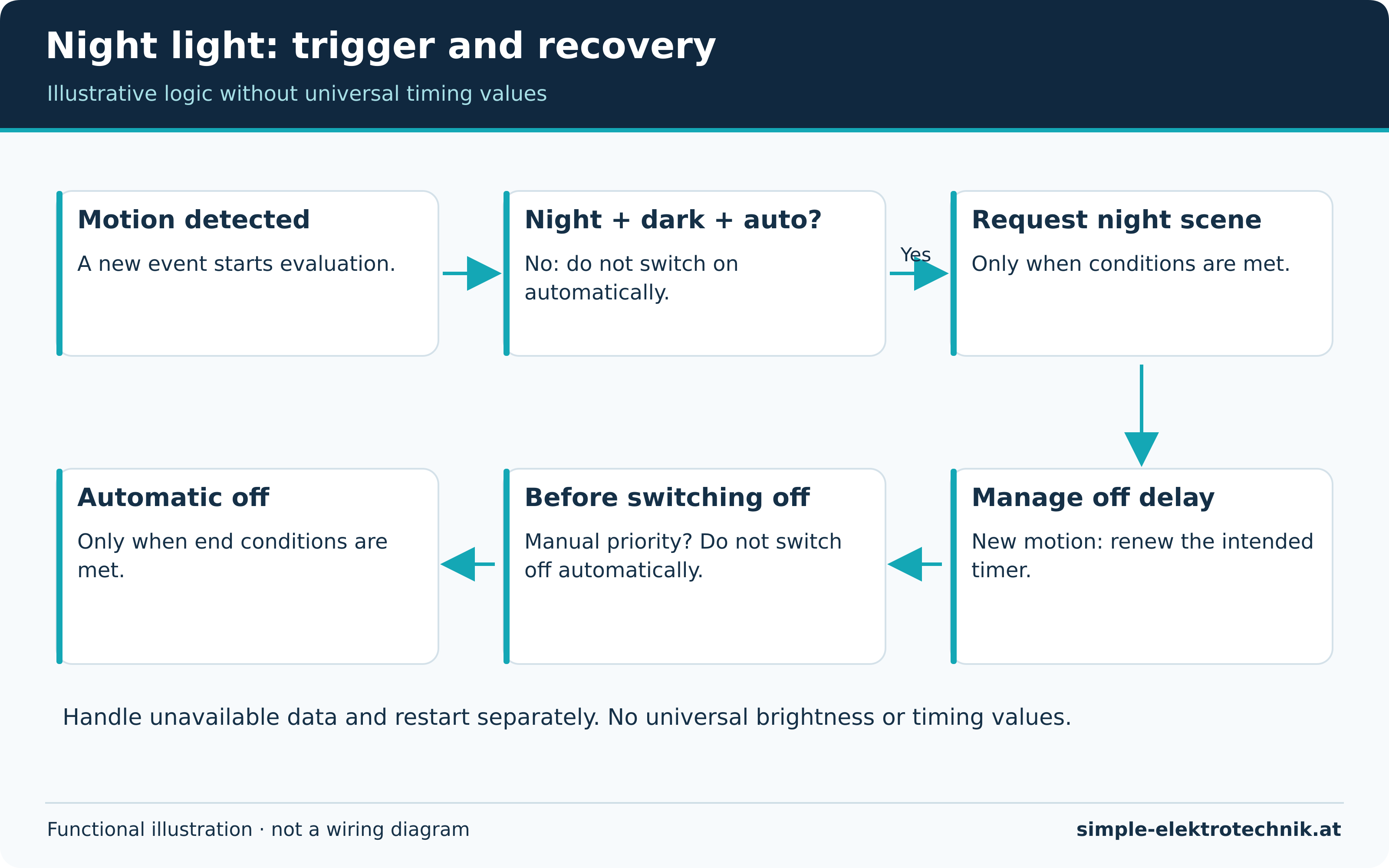
The aim is modest lighting when movement occurs in a dark hallway during night mode, followed by switch-off after an appropriate period without further detection. Deliberate manual control must not be immediately overwritten.
| Element | Illustrative design |
|---|---|
| Trigger | New motion event |
| Conditions | Night mode, sufficiently dark, automatic operation enabled |
| Action | Activate an appropriate night scene |
| Repetition | Renew the intended delay after further detection |
| End | Delay completed with no manual priority |
| Exception | Handle missing data and deliberate manual operation separately |
The flow diagram shows these decisions. Choose brightness and timing for the actual lighting and use. Very low output is not sufficient for every route. Test pets and people remaining still as well.
Repeated events need a deliberate policy
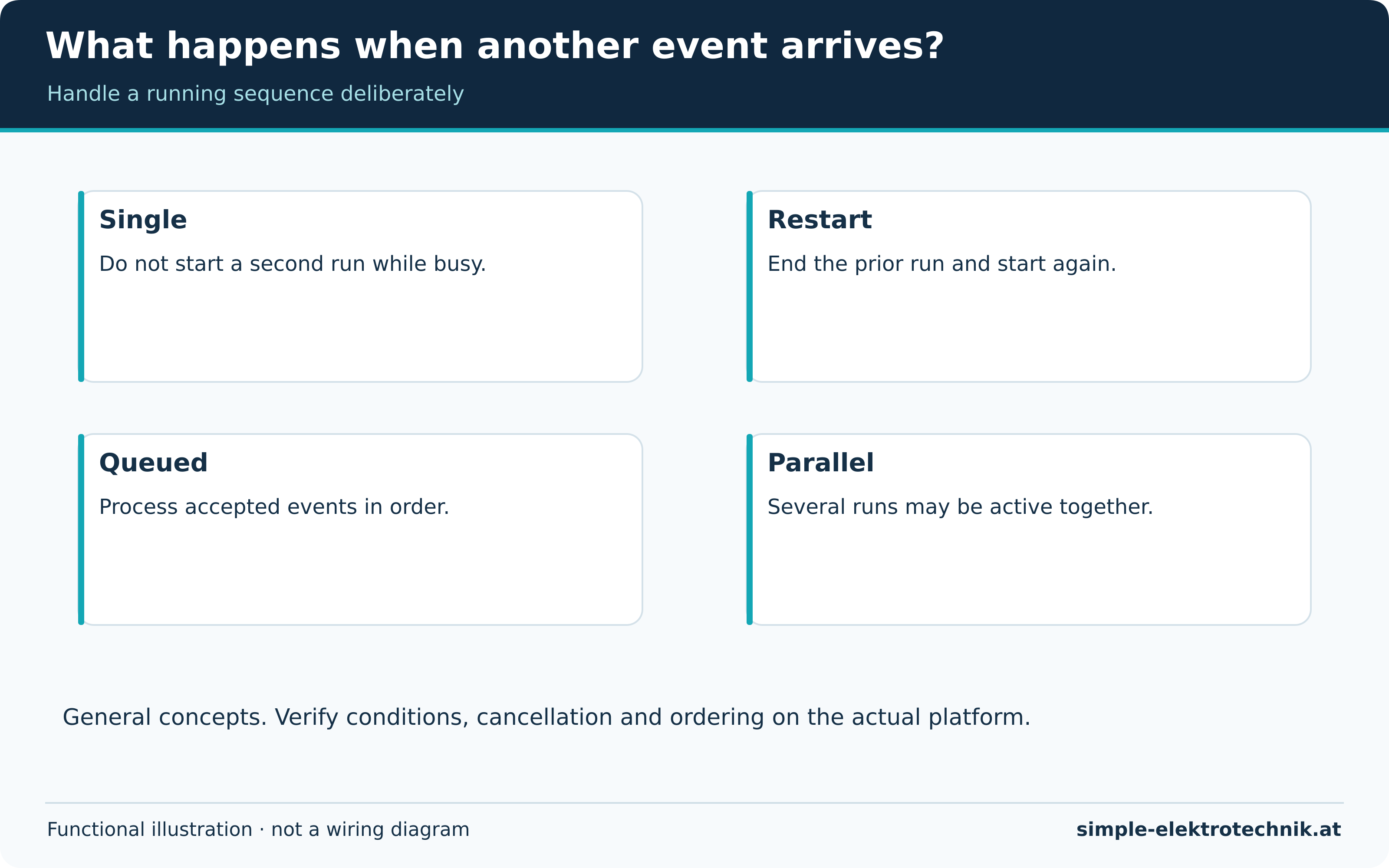
A second event may arrive while a routine is running. Platforms may ignore it, restart the sequence, queue it or run another copy in parallel. These behaviours are not interchangeable.
A deliberately renewed timer may suit a light-off delay. Parallel waits can instead leave old switch-off commands active after new motion. A queue can grow beyond the intended behaviour.
The modes diagram compares these approaches. Check actual platform semantics, including whether conditions are re-evaluated and which previous run is cancelled.
Manual operation and shared modes
Automatic, manual and away modes can coordinate several routines, but must have clear meaning. Away must not indiscriminately remove power from every socket or necessary appliance.
Manual lighting control may temporarily suspend comfort automation. Heating and shading still retain required protective conditions. A numerical priority in a personal routine is not a complete safety design.
Define recovery through an explicit command, suitable timeout or specified usage change. Show users the active mode. Avoid hidden states that only disappear after restarting the controller.
Other practical routines
Open window while heating
After an appropriate delay, a contact can request a limited response or send a notification. Closing and missing data require separate handling. The heating guide explains system limitations. Do not replace protective functions with a simple window rule.
All off when leaving
Use an explicit group of non-critical loads. Do not blindly include refrigeration, networking, heating supply, medically necessary equipment or other important functions. Presence detection can fail, so a clear manual away command is useful.
Water or open-window notification
Define recipients, quiet hours and repetition. Sent does not prove delivered or read, and an alert does not stop a leak. Critical tasks need suitable independent facilities and a realistic response plan.
Failures and restart
A waiting sequence may disappear or resume differently after restart. An in-memory timer is not automatically persistent. Check whether an intended end time is retained and how recovery handles it.
Unavailable is not zero. A missing temperature reading does not necessarily mean frost, and an unavailable presence sensor does not prove an empty home. Recognise invalid data and provide an appropriate fallback and notification.
Testing and documentation
Record purpose, devices, triggers, conditions, actions, priorities, completion and failure behaviour. Clear names such as Hallway automatic night light make diagnosis easier than Automation7.
Test the normal case, false conditions, repeated triggers, manual intervention and restart. Review time-correlated logs or traces. Change one cause at a time and back up a known good configuration.
Common questions
Is a scene an automation?
A scene normally describes target states. An automation defines when and under what conditions actions occur; recalling a scene can be one action.
Why does a satisfied condition not run the rule?
The relevant state change may not be a trigger. A condition alone generally does not start a new run.
Should every routine be complex?
No. Short, testable rules with explicit exceptions are easier to maintain than overlapping routines. Start with the planning guide and use reliable operation when designing recovery.
Sources and further information
Tools for electricians
A compact selection for cutting, stripping, screwdriving and testing. Choose the actual version for the task and follow its instructions.
Advertising / affiliate links. As an Amazon Associate I earn from qualifying purchases. Product images and names lead to the existing Amazon listings.
Weidmüller KT 8 cable cutter
- For suitable copper and aluminium conductors.
- The cutting geometry is designed for a clean cut.
Check conductor material and permitted capacity. A cable cutter is not a general-purpose bolt or steel-wire cutter.
Weidmüller stripax insulation stripper
- Automatic stripping tool for approved conductors and insulation types.
- Includes an adjustable length stop and a separate cutting function.
Stripping range and cutting capacity are different. A stripping range up to 10 mm² does not mean it can cut conductors of the same size.
Fluke LVD2 non-contact voltage detector
- Indicates AC voltage within its intended application.
- Includes two sensitivity levels and an integrated light.
No indication does not prove dead. Shielding, distance and installation affect detection; it does not replace the appropriate two-pole procedure.
PB Swiss Tools PB 5543 VDE screwdrivers
- Set for matching slotted and Pozidriv screws.
- Match the screw profile, size and marked tool version.
Tested insulation does not generally authorise live work. Tool condition and the working procedure remain essential.
Fluke T130/VDE two-pole voltage tester
- For voltage and continuity checks according to its instructions.
- This model family combines LED indication with an additional LCD.
Use the correct proving-dead procedure and required instrument checks. An isolated LCD reading does not replace them.